
Cancelling Membership
Cancelling your membership is easy! If you are not on contract based membership, you can cancel your membership anytime in 4 easy steps before your next automatic payment for the membership goes through.
Cancelling Membership
Cancelling your membership is easy! If you are not on contract based membership, you can cancel your membership anytime in 4 easy steps before your next automatic payment for the membership goes through.
Step 1
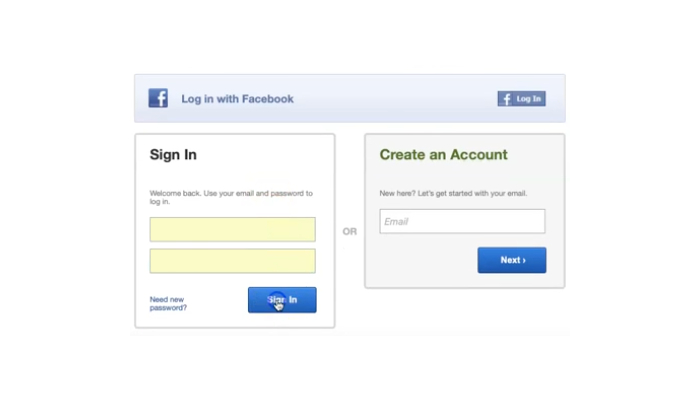
Log in to your Mindbody account with your username and password.
Step 2
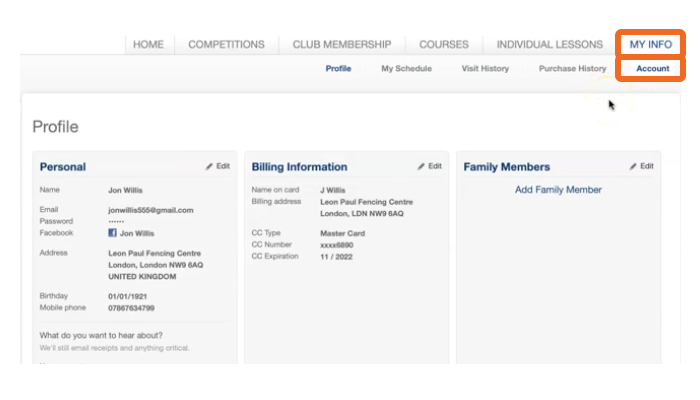
After logging into your account, select “MY INFO” from the top navigation. Once you are at “MY INFO” screen, click on “Account”.
Step 3
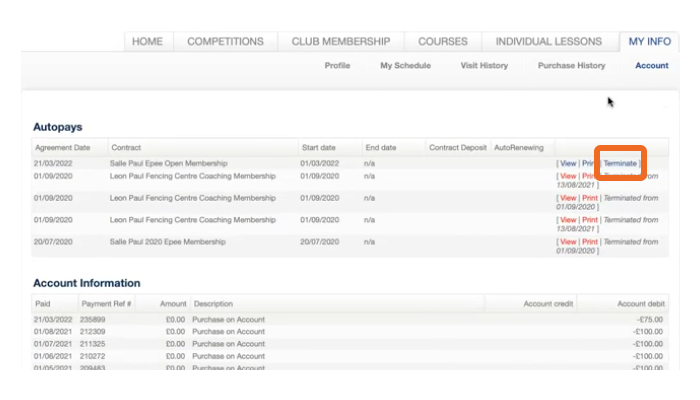
Find your membership you like to cancel from the “Autopays” section and click on “Terminate” located on the right hand side of the related membership.
Step 4
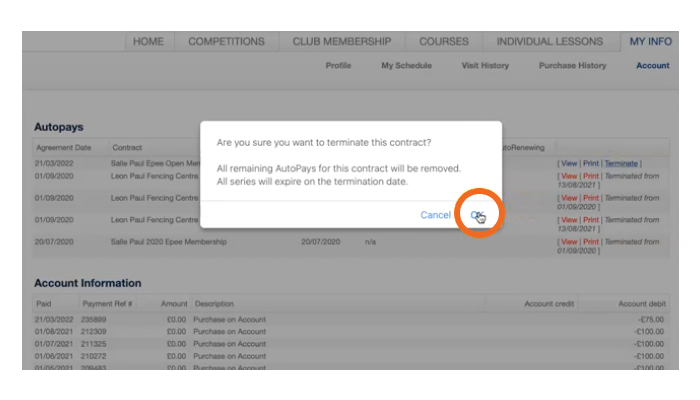
A popup window will open and ask your confirmation for cancelling your membership. Click on “OK” to confirm and terminate your membership.
Step 1
Log in to your Mindbody account with your username and password.
Step 2
After logging into your account, select “MY INFO” from the top navigation. Once you are at “MY INFO” screen, click on “Account”.
Step 3
Find your membership you like to cancel from the “Autopays” section and click on “Terminate” located on the right hand side of the related membership.
Step 4
A popup window will open and ask your confirmation for cancelling your membership. Click on “OK” to confirm and terminate your membership.
MEMBERSHIP OPTIONS
select your weapon to proceed
select your weapon to proceed